![2BTech_FavIcon-WHITE-OUTLINE.png]](https://kb.2btech.io/hs-fs/hubfs/2BTech_FavIcon-WHITE-OUTLINE.png?height=1412&name=2BTech_FavIcon-WHITE-OUTLINE.png)
Technical Note No. 056
Guide for Updating Firmware on PAM in AQSync
Date: 21 February 2024
Author: Craig Williford
Summary:
This Technical Note provides guidance for updating the firmware for the PAM device in
the AQSync using a uSD card.
Tools/Materials Needed:
- uSD card (need at least 1 MB of data storage)
Procedure:
1. Insert a uSD card into a computer.
2. Download the "firmware.bin" file that was sent via email or provided in a link from the 2B Tech support team save it to the uSD card. Keep the same name "firmware.bin" and be sure to put it in the root directory of the uSD card (not in a folder).
3. Turn the AQSync on if it is not already powered on.
4. Locate the PAM inside the AQSync and find the uSD card slot.
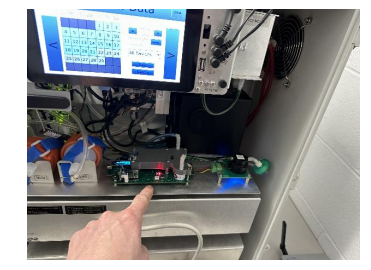
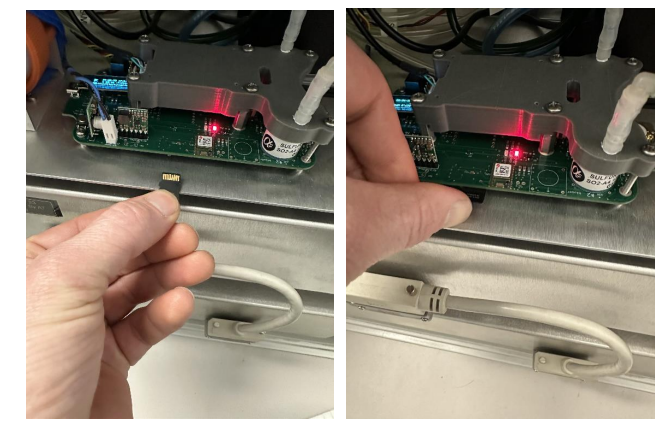
5. Insert the uSD card, upside down as shown into the card slot. The receptacle is
spring loaded so you should push it all the way in and release slowly in case it
doesn't catch or it will potentially spring out abruptly!
6. Once the uSD card slot is in place, press the reset button on the PAM located on the
left hand side of the PAM as shown in picture below.
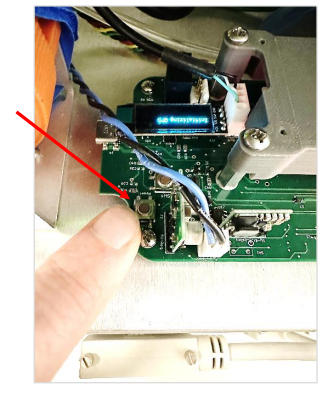
7. After pressing the reset button, the PAM will restart. During initialization, eventually
you will see a message on the small screen on the PAM that says “Updating…”
which will take about 1 minute. After the update occurs, the screen on the PAM will
display the CO and GPS values. You can eject the uSD card after the reset occurs.