![2BTech_FavIcon-WHITE-OUTLINE.png]](https://kb.2btech.io/hs-fs/hubfs/2BTech_FavIcon-WHITE-OUTLINE.png?height=1412&name=2BTech_FavIcon-WHITE-OUTLINE.png)
Technical Note No. 39
Programming of Campbell Scientific CR1000 Data Loggers to Allow Serial
Communication with 2B Tech Analyzers
Date: 08 April 2015
Author: Andrew Turnipseed
Requirements
-
Campbell Scientific CR1000 Data Logger
-
2B Tech Analyzer
-
Serial Cable (“straight through”, not “cross over”)
Background
Although all of the 2B analyzers have internal memory for data storage, it is often
advantageous to collect data via a central field data logger which is linked to
several different instruments and/or meteorological sensors. There are numerous
commercially available data loggers; however, Campbell Scientific has been a
leader in this field for the past few decades and their data loggers have gained
wide acceptance in environmental, meteorological and atmospheric monitoring
studies. As such, there have been numerous situations where 2B customers have
needed to interface their 2B instrument with data loggers manufactured by
Campbell Scientific.
Nearly all 2B Technologies analyzers are capable of outputting a simple analog
voltage that is proportional to the concentration of the species measured (e.g., O3,
NO, NO2) and the simplest method of interfacing is to connect the analog output to
either a differential or single-ended analog input of the data logger. However, this
only provides information on the analyzer concentration output and does not
include any other operating parameters such as the flow rate, temperature or
pressure, which can be useful for verifying the validity of the data. Furthermore,
this analog output can be confusing in cases where multiple concentrations are
measured sequentially (such as in the model 405 which can measure both NO and
NO2). Finally, by simply monitoring the analog output, one cannot interact with the
analyzer. For example, simple serial commands can be used with the Model 410
NO monitor to put the analyzer in a “zero” mode for measuring the offset, followed
by a second command returning it to a normal sampling mode. These serial
commands can be embedded within the timing of the datalogger programing to
perform periodic offset measurements.
Procedure
Current Campbell Scientific data loggers use CRbasic for programming. Below is
an example of CRbasic program written for a CR1000 Campbell Scientific
datalogger which: (1) collects data from a 2B Model 410 NO monitor/Model 401
NO2 converter combination every 10 seconds, (2) outputs an hourly average and
standard deviation of the concentration data (NO and NO2), (3) outputs a second
data table consisting of 10-minute averaged data for concentration as well as
instrumental variables such as flow, temperature and pressure, and (4) switches
the analyzer into a zeroing mode at midnight for 10 minutes. Simple variations of
this program can be used for logging data from other 2B Technologies
instruments. For assistance in modifying this program for other 2B instruments,
please contact 2B Technologies.
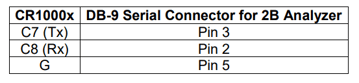
Wiring:
Sample Program:
′CR1000 Series Datalogger
′ **************************************************************************
′ CR-Basic Program to ingest serial data from 2B model 410 NO analyzer coupled
with the model 401
′ NO2 converter
′Written for Campbell Scientific CR1000 data logger, Andrew Turnipseed
′12/15/2014
′ ***************************************************
′ Runs an auto-zero every night at midnight for 10 minutes
′ Serial RS-232 communication on COM port: com4 (Control Ports 7 and 8 on
CR1000)
′ Wiring:
′ CR1000 DB-9 Serial Connector (to 2B)
′ C7 (Tx) -------------------------------- Pin 3
′ C8 (Rx) -------------------------------- Pin 2
′ G (grd) -------------------------------- Pin 5
′ *******************************
′ Flag(1) = Data Flag for 10 min. data
′ Flag(2) = Data Flag for zero mode
′ Flag(3) = Data Flag for hourly data
′ ****************************************************
′ Variables:
Public NO2, NO, NOx, temperature, pressure,
Public Sflow, Tflow, Oflow, Tscrub, O3
Public status, state As Long
Public tout(13) As String *8
Public raw As String *70
Public date As String *8
Public time As String *8
Public Flag(3) As Boolean
Public TC As Long
Public counts As Long
' OUTPUT SECTION
'********** Hourly averaged data ******************************** ***
DataTable(DataHour,true,5000) ′ 5000 hrs = 416 days of data
DataInterval(0,60,Min,0)
Average(1, NO2, IEEE4,Flag(3)) ′Average NO2 concentration
StdDev(1, NO2, IEEE4,Flag(3))
Average(1, NO, IEEE4,Flag(3)) ′Average NO concentration
StdDev(1, NO, IEEE4,Flag(3))
Average(1, NOx, IEEE4,Flag(3)) ′ NOx = NO + NO2
Totalize(1, Counts, Long,Flag(3)) ′ number of measurements included in the
hourly average.
Totalize(1, TC, Long,0) ′ total number of measurements cycles
within the hour.
EndTable
′ Note: (TC – Counts) = the number of measurement cycles not included in the
hourly average.
′ This would include cycles when measuring the offset or times when certain data
flags are violated.
'*************** QC data: *****************************************
'**************** 10 min. avg'd data ********************************
DataTable(Data10min,TRUE,-1) ' will fill remainder of data storage
DataInterval(0,10,Min,0)
Average(1, NO2, IEEE4,Flag(1))
Average(1, NO, IEEE4,Flag(1))
Average(1, temperature, IEEE4,Flag(1))
Average(1, pressure, IEEE4,Flag(1))
Average(1, Sflow, IEEE4,Flag(1)) ′Sample Flow
Average(1, Tflow, IEEE4,Flag(1)) ′Total Flow
Average(1, Oflow, IEEE4,Flag(1)) ′Ozone Flow
Average(1, Tscrub, IEEE4,Flag(1)) ′Scrubber Temperature
Average(1, O3, IEEE4,Flag(1)) ′Excess ozone concentration
Average(1, state, IEEE4,Flag(1)) ′Measurement state (see 2B manual for
Status byte values)
EndTable
′′′′′′′′′′′′′′′′′′′′′′′′′′′′′′′′′′′′'
'Define Subroutines \\\\\\\\\\\\\\\\\\\\\\\\\\\\\\\\\\\\\\\\\\\\\\\\\\\\\\\\\
' none needed!
'\\\\\\\\\\\\\\\\\\\\\\\\\\\\\\\\\\\\\\\\\\\\\\\\\\\\\\\\\\\\\\\\\\\\\\\\\\\\\\\
BeginProg
'Initialize parameters:
Status = 1
Flag(3) = False
Flag(2) = False
SerialOpen(com4, 4800, 0, 0, 300)
'Start sampling loop: 10 sec. sampling cycle
Scan(10,Sec, 3, 0)
′************************ Timing for auto-zero mode *******************************
′ Time to start zero mode on 410:
If TimeIntoInterval(0,1440,Min) Then ' executed at 0 min. into every
1440 (1440 min/day)
SerialOut(com4,CHR(90),"",0,500) ' string sent once, waits for echo for
500x0.01 sec.
' CHR(90) = "Z" == auto Zero mode
Status = 0
Serialflush(com4) ' flush the serial buffer (get rid of stray text)
Flag(2) = True ' data excluded from hourly average
EndIf
′send another command 10 min. later to leave zero mode:
If TimeIntoInterval(10,1440,Min) Then ' Executed 10 min. into the same 1440
min.
SerialOut(com4,CHR(89),"",0,500) ' string sent once, waits for echo for
500x0.01 sec.
' CHR(89) = "Y" == back to previous mode
Status = 1
Serialflush(com4) ' flush the serial buffer (get rid of stray text)
Flag(2) = False ' Reset the hourly data flag
EndIf
′********************* End of zero mode timing *************************************
′ Set Flag(1) to False every time through (assumes data will be valid)
Flag(1) = False
'reading serial output of the model 410:
SerialIn (raw,com4,0,13,75)
'split the string at each comma
SplitStr(tout(1), raw, CHR(44), 13,5)
'converting string to numeric
NO2 = tout(1) 'ppbv
NO = tout(2) 'ppbv
NOx = tout(3) 'ppbv
temperature = tout(4) 'deg. C
pressure = tout(5) 'mbar
Sflow = tout(6) 'cc/min
Tflow = tout(7) 'cc/min
Oflow = tout(8) 'cc/min
Tscrub = tout(9) 'oC
O3 = tout(10) 'ppbv
date = tout(11) 'string
time = tout(12) 'string
state = tout(13) 'state indicator
′ In cases where there is stray text in the serial buffer or a mistiming - do not want to
average data.
If (NO2 = NAN) Then
Flag(1) = True ′Excludes data in 10 min. avgs.
Serialflush(com4) ' flush the serial buffer (get rid of stray text)
EndIf
If (state > 85) Then Flag(1) = True ′Excludes data in Parameter
Adjust Mode
If (Flag(1) = True) OR (Flag(2) = True) Then Flag(3) = True ′Excludes
data in hourly averages
If (Flag(1) = False) AND (Flag(2) = False) Then Flag(3) = False ′Includes
data in hourly averages
TC = 1
Counts = 1
'call Datatable for averaging:
CallTable DataHour
'call Datatable for fast data:
CallTable Data10min
NextScan
EndProg