![2BTech_FavIcon-WHITE-OUTLINE.png]](https://kb.2btech.io/hs-fs/hubfs/2BTech_FavIcon-WHITE-OUTLINE.png?height=1412&name=2BTech_FavIcon-WHITE-OUTLINE.png)
Technical Note No. 048
Balancing Flows in the Model 106 Flow-Through Ozone Monitor
Date: 28 March 2019
Authors: Stanley Strunk and Craig Williford
Overview
Because of unequal restriction in flow paths between the two cycles for computing ozone in
the flow-through version of 2B Technologies 106 series, it may be necessary to add
restrictors to one of the flow paths to balance the flows. Changing the restriction amount
may also necessitate re-zeroing the unit, so it is recommended that the user check the zero
once the flows are balanced.
Tools and Materials Needed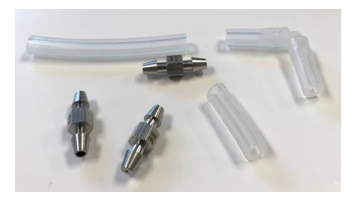
• Phillips head screwdriver
• Exacto knife or similar
• Silicone tubing (¼” o.d.)
• Kynar elbow ( ¼”)
• Flow restrictors (assortment)
• Flow meter
Background Information
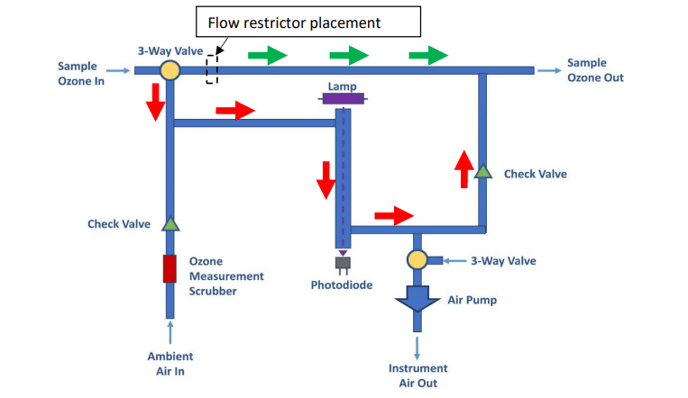
During the measurement cycle, the instrument switches the sample flow between two
pathways (red arrows vs. green arrows). Flow restrictors are placed in the less restrictive
pathway (green arrows) to balance its flow with the more restrictive pathway (red arrows).
The flow restrictors needed will depend on the user’s system pump. Hence this procedure to
balance the flows must be carried out by the user.
Procedure
1.0 Measure the flow imbalance.
• Using the same system and pump you will be using for your ozone sampling, hook
up a source of zero air to your sample inlet.
• Put a flow meter on the outlet of your system (downstream of the Model 106-LFT
ozone monitor).
• With the system running zero air and the ozone monitor making measurements,
observe the flow differential between the two states (low resistance and high
resistance).
For the remainder of the procedure, you will insert flow restrictors as
needed to match the flow between the two states.
Pictures shown are of the Model 106-LFT.
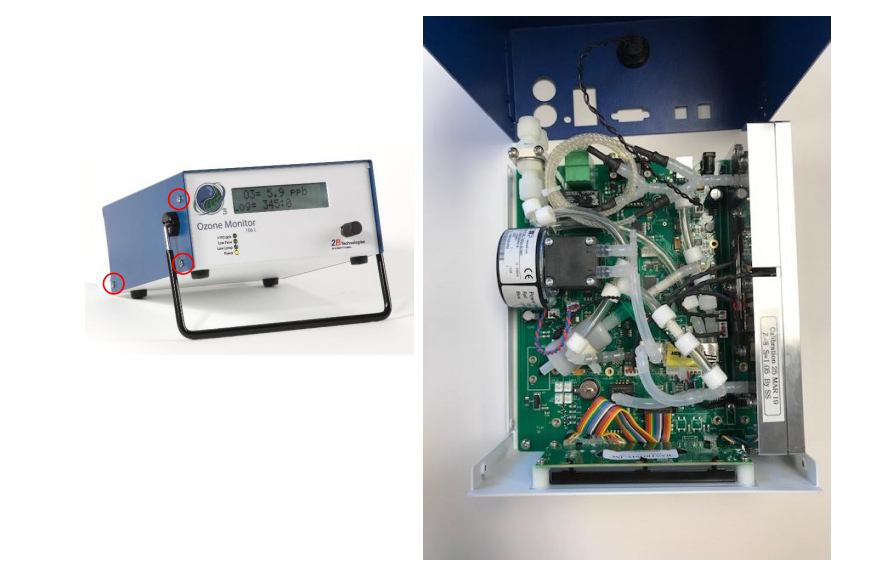
2.0 Remove instrument cover.
• Using the screwdriver, remove the 6 screws holding the blue cover on the
instrument.
• Tilt the blue cover up as shown to access the instrument.
3.0 Add or remove restrictors to balance the 2 flow states.
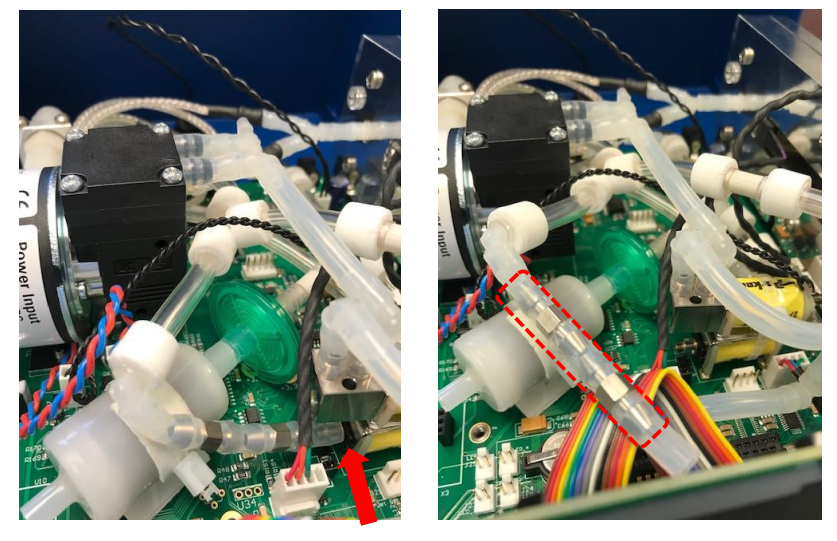
• Disconnect the silicone tubing from the solenoid valve at the point shown by the red
arrow in the left photo.
• In the example shown here, two flow restrictors are installed in the tubing (picture at
right).
• It may be useful to remove all restrictors as a 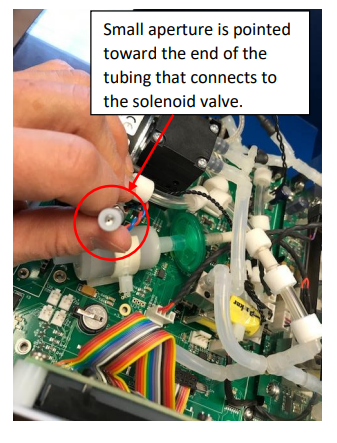
starting point.
• Now add or remove restrictors, observing the
effect on the flow imbalance during the
measurement cycle. Try different combinations
of flow restrictors until the flows are as closely
matched as possible.
• The restrictors are numbered. Lower numbers
are more restrictive (smaller aperture).
• Be sure to install the restrictors so that the
small apertures pointed toward the valve.
4.0 Replace the blue instrument cover.
• When you’ve determined the best combination of flow restrictors for your
system, reinstall the instrument cover.
5.0 Re-zero the instrument.
• Changing the restriction amount may also necessitate re-zeroing the unit, so it is
recommended that the user check the zero once the flows are balanced