![2BTech_FavIcon-WHITE-OUTLINE.png]](https://kb.2btech.io/hs-fs/hubfs/2BTech_FavIcon-WHITE-OUTLINE.png?height=1412&name=2BTech_FavIcon-WHITE-OUTLINE.png)
Technical Note No. 033
Procedure for Charging POM LiPo Battery
Date: 11 September 2012
Author: Craig Williford
Warning!
The POM battery is a Lithium Polymer type battery which requires caution when
recharging. If not handled properly, you risk the possibility of explosion and fire. Please
read the following procedure carefully. Do not allow battery voltage to go below 6.0 Volts.
Requirements
1. Hitec X1 charger
2. POM LiPo Battery
3. Time (1-2 hours)
Procedure
1. Visually inspect battery. If battery is swollen or has any punctures, do NOT attempt to charge.
2. Unpack the Hitec X1 charger from the box and READ the instruction manual.
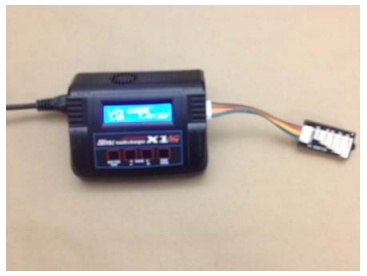
3. Plug in the charger using the AC adapter and plug in the multicolored ribbon cable with the XH adaptor as shown in the picture.
4. Locate the red and black connector with the barrel connector.
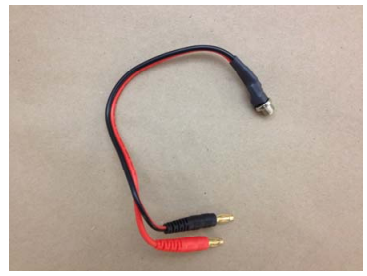
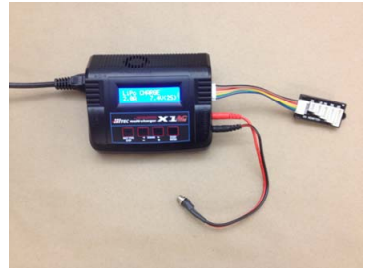
5. Insert the red and black male ends of the connector into the charger as shown.
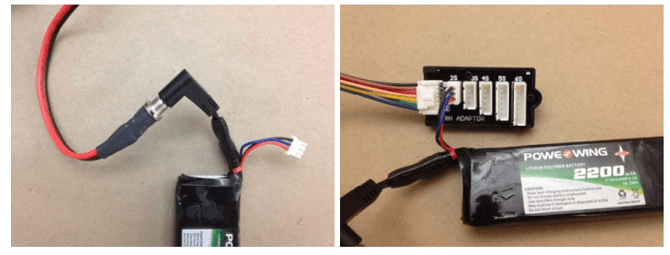
6. Remove the LiPo battery from the POM and plug into the charger as shown in the picture. Note that both connectors from the battery are plugged in. The 3 wire connector is for safety monitoring both cells and the barrel connector is to transfer the current to recharge the battery.
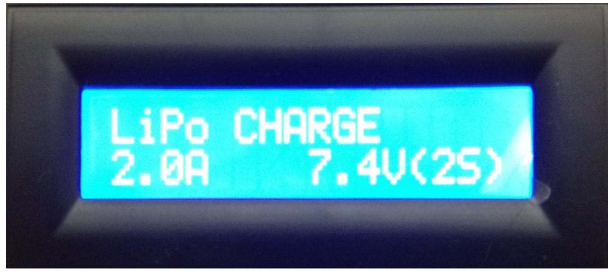
7. Locate the LCD screen on the charger and make sure that it is on. If the screen displays exactly what is shown below, continue to the next step. If it does not display what is displayed in the picture below, press the button labeled “BATT TYPE” to scroll through different battery types until “LiPo CHARGE” is displayed on the first line. The values on the second line “2.0A” and “7.4V(2S)” must also match. To change the values, press the “START ENTER” button to select field and then press the ‘+’ or ‘-‘ button to adjust the values until they match below.
8. Press the “Start Enter” button and hold until the screen changes. It will display “Battery Check” and if the battery passes all tests, then the next screen will appear shown below. If the battery fails any of the tests, it will sound an alarm and stop the process.
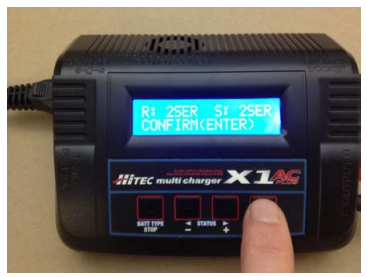
9. If the battery passes the pre tests, the screen above will appear. Press “Start Enter” again to confirm. This will start charging the battery. You will see the diagnostics in the LCD as shown below.
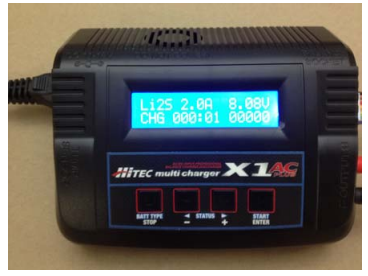
10. When the charge is complete the process will stop and you may disconnect the battery and plug it into the POM. A full charge should take about 1 to 1.5 hours to complete. DO NOT leave the battery charging unattended. This charger is designed to reduce the risk of fire but it is not recommended to leave unattended.
If the Battery does not charge
• The battery may not charge due to a number of reasons
o LOW VOLTAGE is output on LCD
Battery has been over-discharged below the safe charging voltage
This LiPo battery cannot be drained lower than 6.0 Volts. Contact 2B Technologies (http://www.twobtech.com/techsupport.htm) if this error is displayed.
o CONNECTION BREAK is output on LCD
Check all connections and retry. Battery wires may be damaged.