![2BTech_FavIcon-WHITE-OUTLINE.png]](https://kb.2btech.io/hs-fs/hubfs/2BTech_FavIcon-WHITE-OUTLINE.png?height=1412&name=2BTech_FavIcon-WHITE-OUTLINE.png)
Technical Note No. 057
Guide for Resetting Power on PAM (particle.io version)
Date: 12 March 2024
Author: Craig Williford
Summary:
This Technical Note provides guidance for disconnecting the internal batteries from the
circuit board and plugging them back in to perform a full power down reset.
Tools/Materials Needed:
- Phillips Head screwdriver
Procedure:
1) Ensure power button is depressed (flat/off).
2) Disconnect USB power and all cables attached to PAM.
3) Remove 4 corner screws from top of PAM.
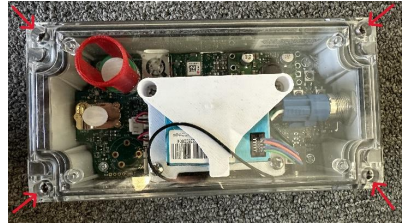
4) Remove lid of PAM and put aside.
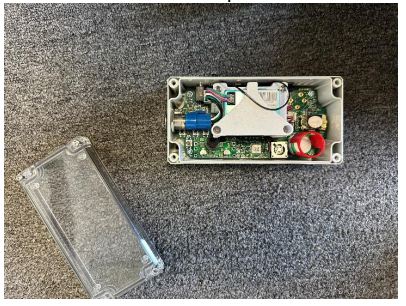
5) Locate the battery connections.
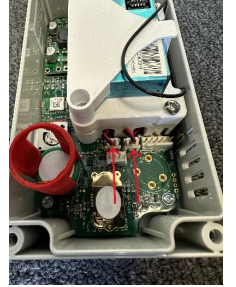
6) Pull each battery connection and leave disconnected for 30 seconds.
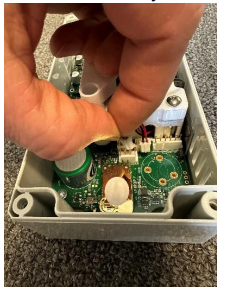
7) Plug both battery connections back into headers (they can both go into either
header).
8) Replace lid, ensure any braces that were on top of sensors are back in place.
9) Tighten screws again.
10) Plug into USB power and try to power on again by pressing in the power button.
11) Observe the fan, the power button LED, and the status LED next to the Red
charging LED to determine if the PAM has powered on properly.
• If plugged in, the Red charging LED should be on, the status LED should
be on and the color will be determined by what the connection status is.