![2BTech_FavIcon-WHITE-OUTLINE.png]](https://kb.2btech.io/hs-fs/hubfs/2BTech_FavIcon-WHITE-OUTLINE.png?height=1412&name=2BTech_FavIcon-WHITE-OUTLINE.png)
Technical Note No. 045
Using the Relays on the Model 106 Ozone Monitors
Date: 20 March 2018
Authors: Craig Williford and Chris Ennis
Overview:
Section 1 of this Technical Note gives some examples of how to use the relays on the
Model 106-L, -M, -MH, and -H Ozone Monitors. Section 2 provides general background
information about how relays work. This Technical Note does not cover all relays, but
instead focuses on the type of relays that are applicable to the Model 106 Ozone Monitors.
Tools needed:
• Flat Head Screwdriver
1.0 Using the Relays on the Model 106 Ozone Monitor
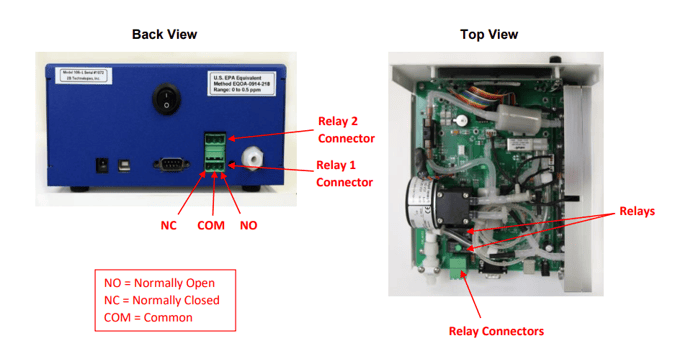
The Model 106 Ozone Monitor has two 12-amp single-pole double-throw (SPDT) relays
that may be used to control other devices, such as ozone generators or alarms.
Connectors for these relays are located as shown below:
The relays in the Model 106 Ozone Monitor can be used in many ways. Some of the
most common examples are described below.
1.1 Control Ozone Produced by an Ozone Generator (Relay 1 and/or Relay 2)
Either or both of the relays of the Model 106 Ozone Monitor may be used to control the
output of an ozone generator. The Normally Open (NO) and Common (COM) contacts
of the SPDT configuration described in Section 2C (below) are used to keep ozone levels
in a zone between a user-defined upper limit and lower limit.
1.1.a Connecting the Ozone Generator and Ozone Monitor
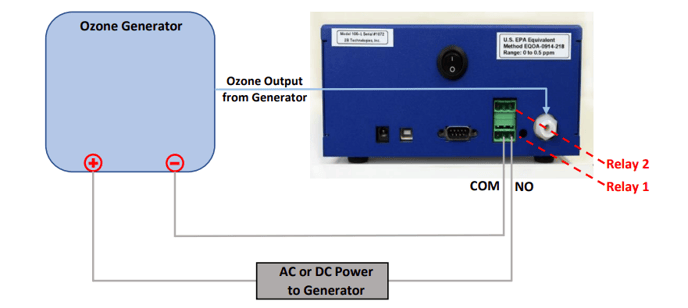
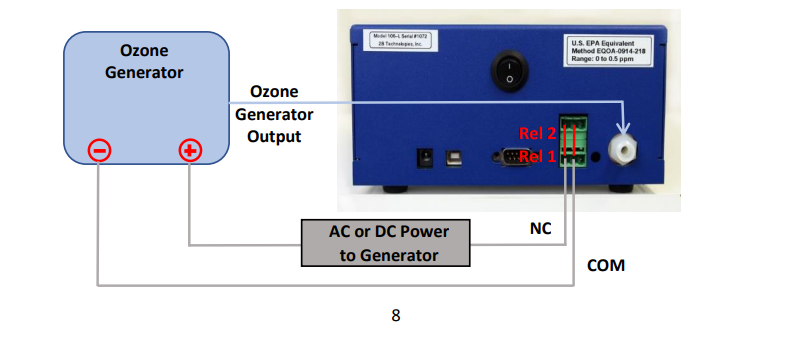
To connect your ozone generator to Relay 1 of the Model 106 Ozone Monitor, follow the
diagram below.
Disconnect power to the ozone generator and the Ozone Monitor before
making the relay connections.
Use the NO (right) and COM (middle) contacts of the green Relay 1 connector. Note that if the power requirements of your ozone generator exceed the 12-amp relays of the Model 106 Ozone Monitor (144 watts), you will need to put a power relay in between your ozone generator and the COM connection of the Ozone Monitor. These are available from electronics suppliers.
1.1.b Enabling Relay 1 to Control an Ozone Generator
The On and Off limits of Relay 1 are specified using the LCD menu of your Model 106
Ozone Monitor. Using the Select switch on the front panel, choose REL1 from the Cfg /I/O /Ext submenu. The menu will show, for example:
On =00900.0 ppb
Off=01000.0 ←
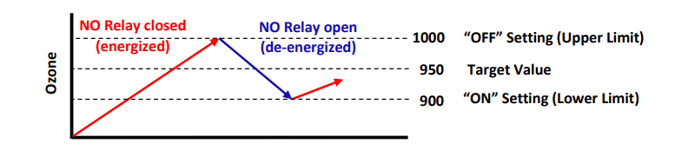
With these settings, the relay will turn on (close, passing current through the COM and
NO contacts) and turn ON the ozone generator until the ozone concentration exceeds 1000 ppb. Above this concentration, the relay turns off and will open, breaking the circuit between COM and NO and turning OFF the ozone generator. The relay will not turn on/close again until the ozone concentration drops below 900 ppb. When it drops below 900 ppb, the relay closes and the ozone generator comes back on. In this way, for example, the ozone concentration from an ozone generator could be controlled in the range 900 to 1000 ppb, about a target value of 950 ppb:
The upper and lower limits should be at least 10% apart, so that the ozone generator is
not switched on and off too frequently. The On (Lower) limit must be above zero
(otherwise, the ozone generator will never turn on). The Off (Upper) limit must be greater
than the On (Lower) limit.
To specify the ozone set points using the LCD menu, move the cursor using the Select
switch to choose the digits in the On and Off relay settings: choose a digit to change by
depressing the Select switch, causing the digit to blink. Rotate the Select switch to
change the digit. Depress the Select switch again to remove the blinking cursor. Repeat
for other digits.
1.1.c Enabling Relay 2 to Control an Ozone Generator
Relay 2 may also be used to control an ozone generator, in a manner analogous to the
procedure described above for Relay 1.
Disconnect power to the ozone generator and the Ozone Monitor before making the relay connections.
Connect the Ozone Generator to the NO and COM contacts of Relay 2 of the Ozone Monitor (as shown for Relay 1 in the figure in Section 1.1.a). In the LCD menu of the Ozone Monitor, choose REL2 from the Cfg / I/O / Ext submenu. The menu will show, for example:
On =00500.0 ppb
Off=00700.0 ←
If you do not see a screen like this, it means that REL2 is currently set as a diagnostic for
non-ozone parameters (e.g., lamp voltage, temperature, pressure, flow rate). If this is the
case, you must first use the serial menu and command “q” to enable REL2 for ozone. To
access the serial menu:
1) Connect the Ozone Monitor’s 9-pin serial port or USB port to your computer’s serial
or USB connection, using a “straight-through” 9-pin female/9-pin female cable or
USB-A to USB-B cable, and other adapter cables as needed to make your specific
connection.
2) Start your data acquisition software (e.g., Tera Term, 2B Data Display), and set it
for the correct COM port and for the baud rate of your instrument as set in the LCD
menu (Cfg / I/O submenu). Other settings are 8 bits, no parity, 1 stop bit.
3) With the Ozone Monitor running, type “m” to access the serial menu.
Measurements will be interrupted, and the terminal emulator will display: menu>
4) At the menu> prompt, type “q” to set Relay 2 for ozone.
5) Type “x” to exit the serial menu and resume measurements.
6) Now use the LCD menu to set the ON and OFF limits of REL 2, using the same
procedure described above for REL1 (Section 1.1.b).
1.2 Operate an Ozone-Level Alarm (Relay 1 and/or Relay 2)
The relays of the Model 106 Ozone Monitor may be used to turn on the user’s warning
light or alarm if ozone exceeds a user-specified upper limit or goes below a user-specified
lower limit.
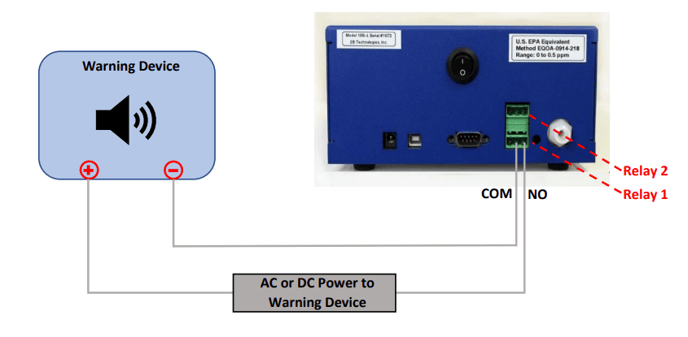
1.2.a Warning for Lower Limit
Relay 1 or Relay 2 may be used to activate the user’s warning device if the ozone has
dropped below a user-defined lower limit. In this case, the warning device takes the place
of the ozone generator in the figure of Section 1.1.
Disconnect power to the warning device and the Ozone Monitor before making the relay connections.
Use the COM and NO contacts of either relay (Relay 1 shown in the example below):
Use the LCD menu, Cfg / I/O submenu of the Ozone Monitor to set the on/off limits of the
relay you’re using. For example, if you want to activate the warning device when ozone
drops below 1000 ppb, set
On =01000.0 ppb
Off=01010.0 ←
With these settings, the relay will turn on (close, passing current through the COM and
NO contacts) when the ozone drops below 1000 ppb. This will turn ON the warning device
until the ozone concentration exceeds 1010 ppb. Above this concentration, the relay will
turn off (i.e., open), breaking the circuit between COM and NO and turning OFF the
warning device. The relay will not turn on/close again until the ozone concentration drops
below 1000 ppb. When it drops below 1000 ppb, the relay closes and the warning device
comes back on.
The On (Lower) limit must be above zero (otherwise, the warning device will never turn
on). The Off (Upper) limit must be greater than the On (Lower) limit.
If using Relay 2 for this warning, Relay 2 must be set for responding to ozone (rather than
non-ozone parameters). See Section 1.1.c for information and procedures.
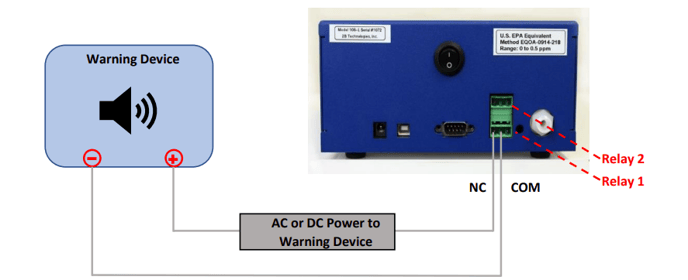
1.2.b Warning for Upper Limit
Relay 1 or Relay 2 may be used to activate the user’s warning device if the ozone has
exceeded a user-defined upper limit.
Disconnect power to the warning device and the Ozone Monitor before making the relay connections.
Use the COM (middle) and NC (left) contacts of the relay (Relay 1 is shown in the example below):
Use the LCD menu, Cfg / I/O submenu, of the Ozone Monitor to set the on/off limits of the
relay you’re using. For example, if you want to activate the warning device when ozone
goes above 1000 ppb, the settings could be
On =00990.0 ppb
Off=01000.0 ←
With these settings, the relay is ON/open (no current passing through the COM and NC
contacts) and the warning device is untriggered until the ozone reaches 1000 ppb. At
that point the relay turns OFF/closes (current begins flowing) and triggers the warning
device. The relay stays off, current flows between COM and NC, and the warning continues until the ozone concentration reaches 990. At this concentration, the relay will
turn ON/opens and current stop flowing between COM and NC, restoring the warning
device to its normal untriggered state. The relay will stay on until the ozone concentration
goes above 1000 ppb. When it goes above 1000 ppb, the relay goes OFF, current flows
between COM and NC again, and the warning device comes back on. The ON setting in
this example is 990 ppb, which provides a zone of 10 ppb below the limit before turning
off the warning device, but other values below 1000 could be chosen.
The On (Lower) limit must be above zero (otherwise, the warning device will never turn
off). The Off (Upper) limit must be greater than the On (Lower) limit.
If using Relay 2 for this warning, Relay 2 must be set for responding to ozone (rather than
non-ozone parameters). See Section 1.1.c above for information and procedures.
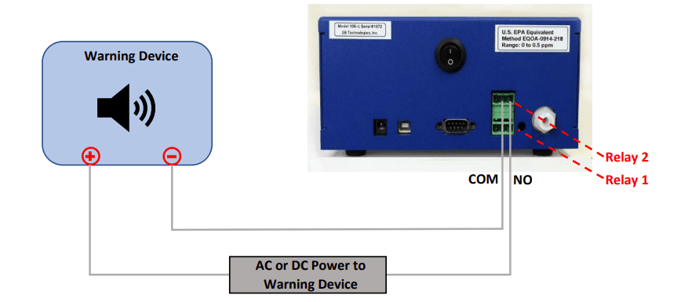
1.3 Operate Alarms for Non-Ozone System Parameters (Relay 2)
Relay 2 may be used to indicate diagnostics other than ozone. These include cell
temperature, cell pressure, flow rate, and lamp voltage. If any of these are out of their
limits, the relay will turn on. Otherwise it is off. Your warning device should be connected
to the COM and NO contacts of the Relay 2 connector as shown below.
Disconnect power to the warning device and the Ozone Monitor before making the relay connections.
Power on the Ozone Monitor and use the serial menu to configure Relay 2:
1) Connect the Ozone Monitor’s 9-pin serial port or USB port to your computer’s serial
or USB connection, using a “straight-through” 9-pin female/9-pin female cable or
USB-A to USB-B cable, and other adapter cables as needed to make your specific
connection.
2) Start your data acquisition software (e.g., Tera Term, 2B Data Display), and set it
for the correct COM port and for the baud rate of your instrument as set in the LCD
menu (Cfg / I/O submenu). Other settings are 8 bits, no parity, 1 stop bit.
3) With the Ozone Monitor running, type “m” to access the serial menu.
Measurements will be interrupted, and the terminal emulator will display: menu>
4) At the menu> prompt, type “o” to set Relay 2 for non-ozone diagnostics.
5) Type the following commands to enable Relay 2 for any or all of the four
diagnostics:
1 Enable temperature inclusion for relay 2.
! Disable temperature inclusion for relay 2.
2 Enable pressure inclusion for relay 2.
@ Disable pressure inclusion for relay 2.
3 Enable flow inclusion for relay 2.
# Disable flow inclusion for relay 2.
4 Enable pdv inclusion for relay 2.
$ Disable pdv inclusion for relay 2.
6) Type “x” to exit the serial menu and resume measurements.
The device will be triggered at the factory-set thresholds. If any of these are out of their
limits, the relay will turn on (energized/closed, current flows to warning device). Otherwise
it is off (de-energized/open, no current flows to warning device). The thresholds are:
| Diagnostic | Low Limit | High Limit |
| Photodiode Voltage | 0.6 V | 2.45 V |
| Flow Rate | 400 cc/min | 2000 cc/min |
| Detection Cell Temperature | 5ºC | 50ºC |
| Detection Cell Pressure | 500 mbar | 1100 mbar |
If the warning device is triggered, use the serial data to determine which diagnostic has
caused the warning. A typical data line will read:
3.2,309.4,759.3,840,1.212,15/10/2016,18:31:27
where:
Ozone = 3.2 ppb
Cell temperature = 309.4 K
Cell pressure = 759.3 torr (1 atm = 760 torr = 1013 mbar)
Flow rate = 840 cc/min (volumetric)
Photodiode Voltage = 1.212 volts
Date = October 15, 2016
Time = 6:31:27 pm
Also, a lamp test can be performed from the LCD menu to check the photodiode voltage,
offset, and standard deviation. See the manual for your Model 106 instrument for more
information about the lamp test. Also refer to the Troubleshooting section of the manual
to further investigate the problem.
1.4 Operate a System Override for an Ozone Generator (Relays 1 and 2 together)
Relays 1 and 2 may be used together to switch off an ozone generator if system
parameters go outside of operating limits for ozone concentration, cell temperature, cell
pressure, flow rate, or photodiode voltage. In this configuration, Relay 1 and Relay 2 are
connected in series as shown in this simplified schematic:
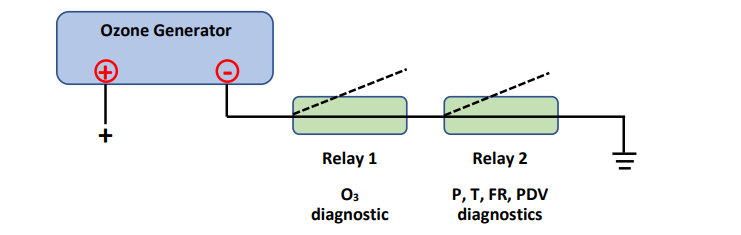
In normal operation shown above, Relay 1 and Relay 2 are off. They stay closed and
current is flowing to the ozone generator (generator producing ozone).
If ozone goes above the upper limit specified by the user, Relay 1 turns on and opens.
This breaks the circuit and turns off the ozone generator. The settings for Relay 1 are
specified by the using in the LCD menu of the Ozone Monitor, following the procedure
described in Section 1.1.b above.
Likewise if any or all of the parameters P, T, FR, or PDV go outside the factory-set
thresholds (see table in Section 1.3 above), Relay 2 turns on and opens. This breaks the
circuit and turns off the ozone generator. Relay 2 must be set to respond to non-ozone
parameters, via the serial menu (command o; see explanation above in Section 1.3).
Disconnect power from all 3 of these devices before making your connections.
Use the COM and NC contacts of the relay connectors. The red vertical lines show short
jumper wires to connect Relay 1 and Relay 2.
2 Relays: Principle of Operation
A relay is switch that opens and closes circuits electromechanically or electronically, using
a relatively small electric current to turn on/off a larger electric current. Many types of
relays exist. Two basic types of relays are electromagnetic relays, and electronic relays.
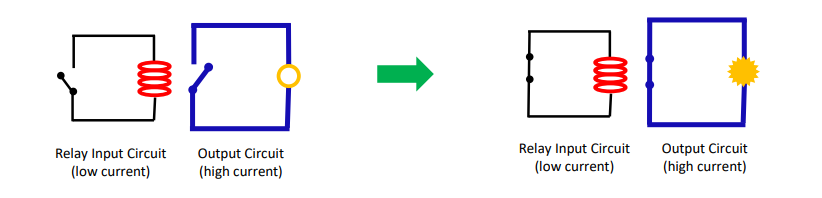
In an electromagnetic relay, a coil of wire becomes a temporary magnet when electricity
flows through it. This magnet activates the switch in the second (higher-current) circuit.
The high-current circuit can be used to activate another device, such as a light, alarm, or
ozone generator.
Electronic (or solid state) relays use non-moving electronic devices such as rectifiers to
switch the current. There are advantages and disadvantages to each of these basic types
of relays. The Model 106 Ozone Monitors use electromagnetic relays because they
provide a cleaner on/off signal, are economical, and offer good long-term performance.
Relays can be configured in several ways. A few common examples:
2.1 Normally Open (NO) Relay
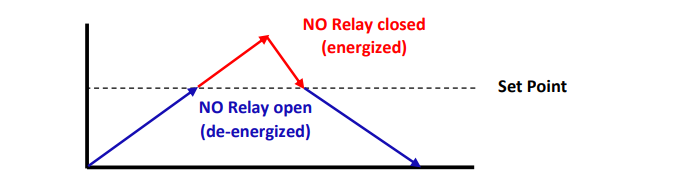
This is the most common relay configuration. The NO contact is open (no current flowing)
unless the relay is activated. When a programmed set point is reached, the relay is
energized (activated). This closes the relay and allows current to flow. When the
parameter drops below the set point, the relay opens again, and current does not flow.
The diagram below shows the operation of the NO relay with respect to the set point:
NO relays are typically used to set off health and safety alarms when a threshold (set
point) is reached, or to turn equipment on and off.
2.2 Normally Closed (NC) Relay
In the NC configuration, the NC and COM contacts are closed (current flowing) unless
the relay is activated. When a programmed set point is reached, the relay is energized
(activated). This opens the relay and stops the current flow. When the voltage drops
below the set point, the relay closes again, and current flows. The diagram below shows
the operation of the NC relay with respect to the set point:

NC relays are typically used to keep system parameters in check, for example,
temperatures, pressures, or gas concentrations.
2.3 Single-Pole Double-Throw (SPDT) Relay
The Model 106 Ozone Monitor has two 12-amp relays that may be 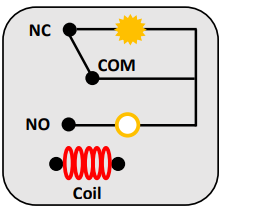
used to control other devices, such as ozone generators or alarms. Each is a Single-Pole Double-Throw relay with three contactpoints: Common, Normally Open (NO), and Normally Closed (NC). The figure at right shows a simple SPDT relay.
The SPDT relay can be used to create a “zone” of permissible values (typically ±10%) for a parameter, such as gas concentration, temperature, pressure, etc. The upper and lower limits of the zone are controlled by energizing and de-energizing the relay at chosen set points: