![2BTech_FavIcon-WHITE-OUTLINE.png]](https://kb.2btech.io/hs-fs/hubfs/2BTech_FavIcon-WHITE-OUTLINE.png?height=1412&name=2BTech_FavIcon-WHITE-OUTLINE.png)
Technical Note No. 058
API Authentication (for Models AQLite, AQSync, and PAM)
Date: 27 June 2024
Author: David Kopala
Summary:
2B Technologies' data Application Programming Interface (API) uses an HTTP header
to authenticate and authorize requests. Include this header to obtain secure connection
to your data.
Tools/Materials Needed:
Each company is granted a unique API key. Contact your company admin to see if one
already exists for your company. If not, contact 2B Technologies to request one.
Procedure:
Authenticate the Request
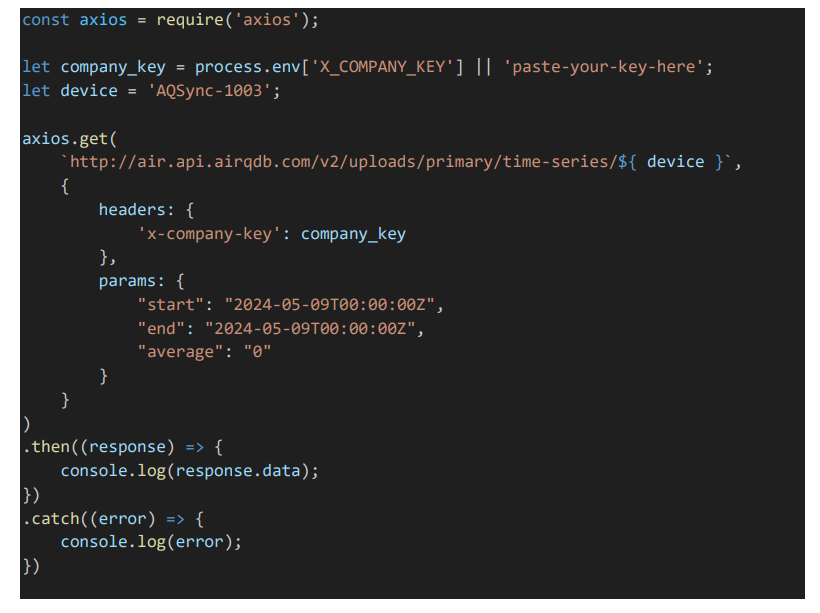
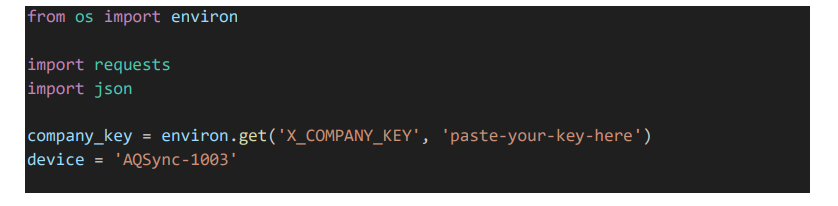
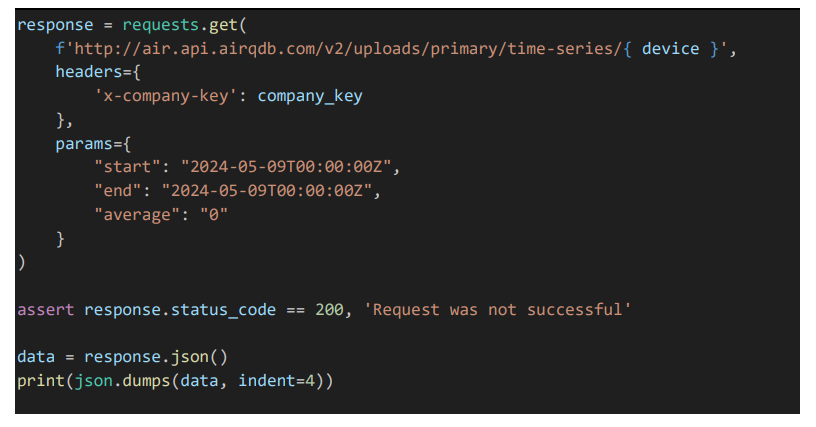
Once you have an API key, add a new header to your HTTP request with the key x-company-key, with the value set to the API key. See the code examples below for how
to add this to your request.
Note that the response code will indicate if the request was successful and will help in
diagnosing issues.
A 200 code indicates that the request was successful!
A 401 code indicates that the request is unauthenticated. Most likely, the API key
was typed or copied wrong.
A 403 code indicates that you do not have permission to view the requested
device. If you believe this to be an error, please contact 2B Technologies.
Using python
Using JavaScript