![2BTech_FavIcon-WHITE-OUTLINE.png]](https://kb.2btech.io/hs-fs/hubfs/2BTech_FavIcon-WHITE-OUTLINE.png?height=1412&name=2BTech_FavIcon-WHITE-OUTLINE.png)
Technical Note No. 028
Using the 4-20 mA upgrade on Model 202 and 205 Ozone Monitors
Date: 5 November 2011, updated 12 December 2018
Author: Craig Williford
Connections to Enable the 4-20 mA Output
For newer instruments
The data may be logged in real time using a data logger attached to the BNC output
connector on the back of the instrument. In the standard configuration of the
instrument, this output is in volts (0-2.5 V).
Changing the analog output to current (4-20 mA) requires some simple modifications to
the printed circuit board of the instrument:
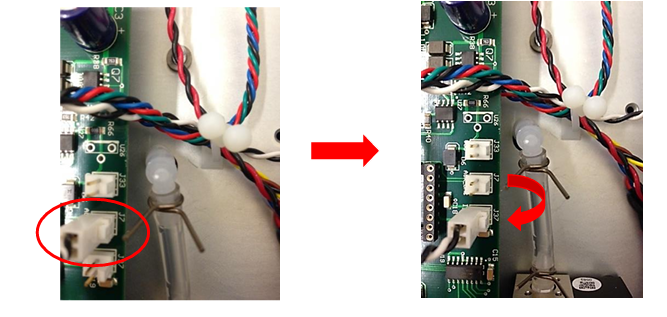
1. Move the “Analog Out” Molex connector from J7 to J37
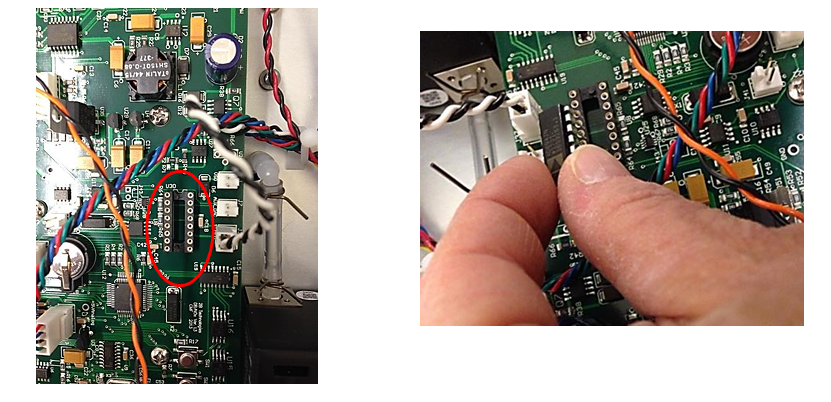
2. Install the Integrated Circuit 4-20 mA Converter (AD694JN) component onto header
U30. Call 2B Technologies to obtain this component (303 273-0559).
You may have to bend the pins of the component in slightly to get it to fit into the
header.
For older instruments
The data may be logged in real time using a data logger attached to the D9
connector on the back panel of the instrument using either a current recorder or
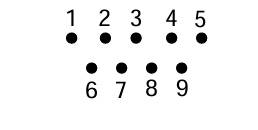
data logger. The 4-20 mA current output is measured across pins #9 (+) and #5
(ground). Looking at the back of the instrument, the pin numbers for the
connector are:
Scaling the Analog Output
To change the analog output voltage scaling factor, go to Menu/Cfg/I/O/Ext. The display will briefly read “VOUT Menu” followed by
Vout Menu 2.5V=00500 ppb ←
In this example, the output scaling factor is set as 2.5 Volt (full scale) = 500 ppb; i.e. 1 Volt = 200 ppb. Also, the current output will be scaled such that the full scale of 20 mA corresponds to 500 ppb. A reading of zero ozone concentration will be output as 0 V and as 4 mA. You can use the select switch to change the scaling factor to the value of your choice by selecting and changing the individual digits in the scaling factor of either the voltage or current. Thus, the instrument is
not limited to a fixed number of “ranges” common to most ozone monitors. Instead, any range can be defined.