![2BTech_FavIcon-WHITE-OUTLINE.png]](https://kb.2btech.io/hs-fs/hubfs/2BTech_FavIcon-WHITE-OUTLINE.png?height=1412&name=2BTech_FavIcon-WHITE-OUTLINE.png)
Technical Note No. 035
Procedure for Programming Model 106 Ozone Monitors
Date: 29 November 2012
Author: Craig Williford
Procedure Outline:
I. Programming Analog Devices Microcontroller through serial port
III. Troubleshooting
Accessories Needed:
-RS232 straight through cable (provided with instrument)
-Flat head screw driver
-12 Volt Power supply
Software Needed:
-Analog Devices “WSD” (Windows Serial Downloader)
I. Programming Analog Devices Microcontroller through serial port:
1. ****Before starting, be sure to write down calibration parameters including Flow meter and
ozone cal factors located in the menu because they will need to be re-entered after re-programming the new firmware to the instrument.
2. Install WSD if not already installed and start software.
3. Ensure correct serial port is selected in “Configuration” (normally com1 but check if using USB to serial adapter)
4. Plug in 12V power supply to PCB.
5. Plug in RS232 straight through cable
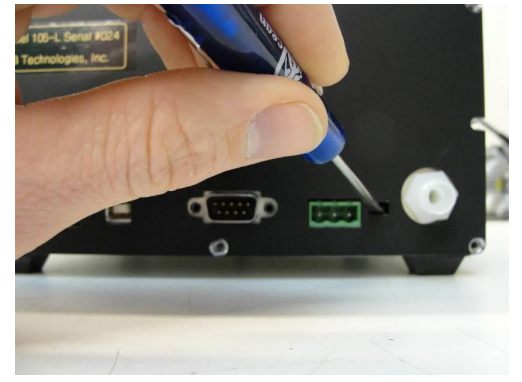
6. Insert flat head screw driver perpendicular to base of instrument into small rectangular slot to
short 2 visible pins together located on back panel of enclosure between inlet and green relay
header. Once the screwdriver is between both pins, slightly rotate it so that it is touching both
7. Turn on power to instrument.
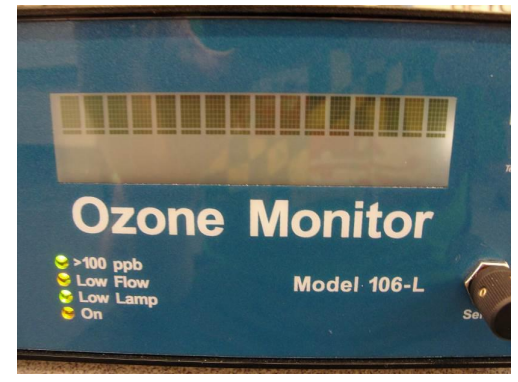
8. Remove screw driver from slot. Check front LCD screen. The top row should be filled with
blank squares if ready to program.
9. Press “Download” button on WSD software window.
10. Select proper .hex file to download. Downloading will proceed.
11. Re-enter calibration parameters into the menu.
12. Done. If problems, see troubleshooting at end of procedure.
II. Troubleshooting
1. Problems with downloading to Analog Devices Microcontroller.
a) Download Failed with Error code 4.
-Restart with step 5 again and proceed. -If problem persists, contact 2B Technologies, Inc. at 303-273-0559